Business Builders
Monday November 9, 2026
The MedSLP
Blueprint.
Every rebuild starts with a clear plan. Today we build yours.
Theresa Richard · Kristen West · Joy Rhodes · Chris Webster
Business Builders
The Blueprint
What today is
We walk the system
layer by layer.
For each layer
What it does
In plain language, what that piece of the platform is responsible for and how a member experiences it.
Then
What it replaces
Which of your current tools that layer takes over, and what stays exactly where it is.
Then
Where it could trip
The roadblock we would hit on that layer, named up front rather than discovered halfway through.
And the point
What we need to know
The open question on that layer. Your answers are what turn this into a full scope and a real price.
So today is
An alignment conversation, not a presentation. Interrupt on every layer. If we leave without your answers, we cannot scope the build.
Business Builders
The Blueprint
Current platform architecture
Almost all of it runs inside
one WordPress site.
Inside WordPress
medslpcollective.com
Theme
Every page a member sees
LearnDash
Courses, lessons, quizzes, progress, completions
Gravity Forms
A separate reporting form on every course
Memberium
Turns email tags into site access
Media library
Downloadable resources and artwork
Outside it
ThriveCart
Checkout and billing
ActiveCampaign
Email, CRM and the tags
Vimeo
Every course video
ASHA submission
Pulled and sent by hand
The path a member takes today
Buys in ThriveCart
ActiveCampaign tags them
Memberium opens access
LearnDash serves the course
Vimeo plays the video
Form, then the quiz
Reported to ASHA by hand
Business Builders
The Blueprint
Eight layers.
One at a time.
Same four questions on each one. Your answers are the scope.
Business Builders
The Blueprint
Layer one of eight
Accounts
and access.
Purpose
One record of who each member is, and one answer to what they are allowed to open.
What it has to do
One account per member, one place to sign in.
Carry existing passwords across so nobody is forced to reset on launch day.
Hold more than one level of access, and more than one way to earn it.
Let your team grant or remove access by hand when something needs fixing.
Keep a member's identity details on file so they are not re-typed on every course.
Survive a member changing their email address without losing their history.
What we need to know
How many levels of access exist today?
Who has access that did not come from a purchase?
Which identity details do you need held on a member?
Who on your team should be able to grant or remove access?
Business Builders
The Blueprint
Layer two of eight
Payments and
membership.
Purpose
Keep taking money exactly as you do now, and make access follow the payment on its own.
What it has to do
Listen to checkout for every purchase, renewal, refund and cancellation.
Open access the moment a payment clears, with nobody flipping a switch.
Handle a failed rebill without locking someone out the same day.
Handle a paused plan, and the day it resumes.
Handle an upgrade part way through a term.
Give your team one screen that explains why a member does or does not have access.
What we need to know
Every product and plan currently on sale, and what each one unlocks.
What happens today when a card fails?
Can a member pause, and for how long?
Is anything sold outside the cart?
Business Builders
The Blueprint
Layer three of eight
The catalog and
the library.
Purpose
Hold everything you teach and everything you hand out, in one place a member can search.
What it has to do
Courses, with lessons and required steps inside them.
Downloadable resources held in the product, not linked out to somewhere else.
Categories and filters that match how a clinician actually looks for something.
One search that returns courses and resources together.
A way to retire a course without destroying its completion history.
Somewhere for the course artwork, so it stays consistent everywhere it appears.
What we need to know
Which courses are genuinely live, and which are retired or hidden?
Where do the resource files live today?
How should courses and resources be grouped?
Does anything need to be visible but not purchasable?
Business Builders
The Blueprint
Layer four of eight
Video
delivery.
Purpose
Get the video to actually play for a clinician sitting inside a hospital.
What it has to do
Serve video from your own web address, not a third party's.
Store the files in an account held in your name.
Expire the links so a video cannot be lifted and passed around.
Play properly on a phone, a tablet and a desktop.
Remember where a member stopped watching.
Allow a downloaded copy later, if you decide to ship an app.
What we need to know
Which facilities have been reported as blocking it?
Do you hold the original files, or only what is on the video host?
Does anything need to be public, such as a preview?
Business Builders
The Blueprint
Layer five of eight
Progress and
assessment.
Purpose
Know what every member has watched, passed and finished, and never lose that record.
What it has to do
Track progress inside a course, not just started or finished.
Run the assessment with a pass mark and retries.
Mark a course complete only once every required step is genuinely done.
Carry every historical completion across unchanged.
Produce the certificate a member expects at the end.
Let your team look up any member's full history in one place.
What we need to know
How far back does the record have to reach?
What is the retention requirement you are held to?
Do pass marks or retry limits vary between courses?
Does anything outside the website rely on these records?
Business Builders
The Blueprint
Layer six of eight
CEU and compliance
records.
Purpose
Hold the data behind credits so the reporting you already do gets easier, not different.
What it has to do
Store a credit value against every course.
Record what each member has earned, and when they earned it.
Mark which completions have already been reported, so nothing goes twice.
Keep the required form in the sequence, once rather than on every course.
Give your team a clean export at reporting time.
Allow a member to see their own earned credits, if you want that later.
What we need to know
The credit value for every course, in any format.
Does anything else in the business already track this?
What has to appear on a report for it to be accepted?
How often do you report, and on what cycle?
Business Builders
The Blueprint
Layer seven of eight
Admin and
publishing.
Purpose
Let your team run the whole platform without ever calling a developer.
What it has to do
Build a course start to finish on one screen.
Upload video and attach resources in the same place, at the same time.
Build the assessment without opening a second tool.
Enforce the required sequence so a step cannot be missed.
Look up a member and fix their access immediately.
Pull the reports your team already pulls, without a spreadsheet in between.
What we need to know
A recorded walkthrough of building one course, end to end.
Who needs admin access, and at what level?
What do you do most often that is slowest today?
Is the required sequence the same on every course?
Business Builders
The Blueprint
Layer eight of eight
Email and
the CRM.
Purpose
Keep your email running exactly as it does, on better information than it gets today.
What it has to do
Tell the CRM when someone joins, finishes a course, goes quiet or lapses.
Keep every contact record matched to a platform account.
Fire the events your existing automations already depend on.
Stop anything structural depending on a website tag.
Let your team segment on real activity rather than on a guess.
What we need to know
Which automations fire off website tags rather than purchases?
Who owns the automations today?
What would you want to email about that you cannot today?
Business Builders
The Blueprint
Now the
look of it.
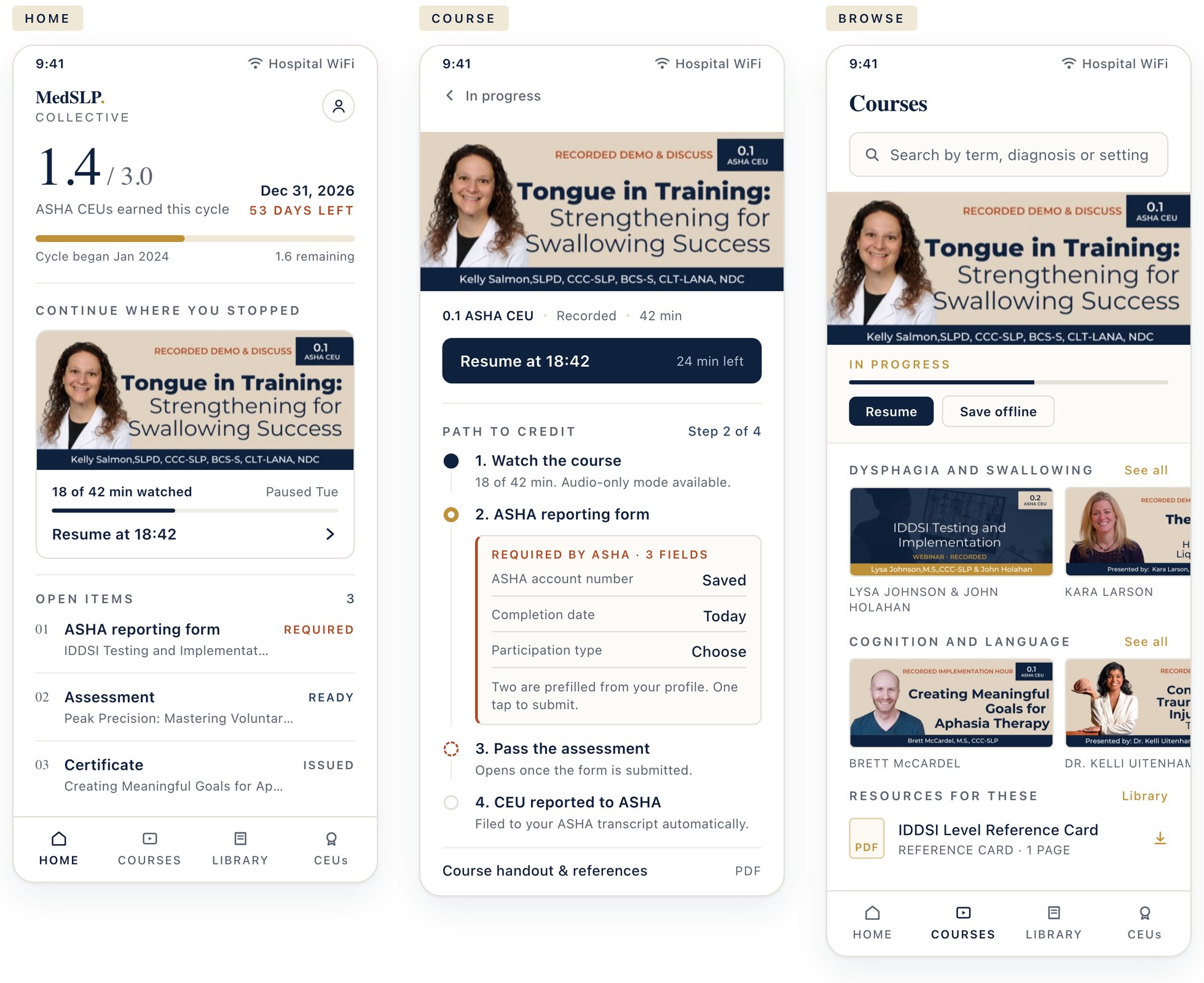
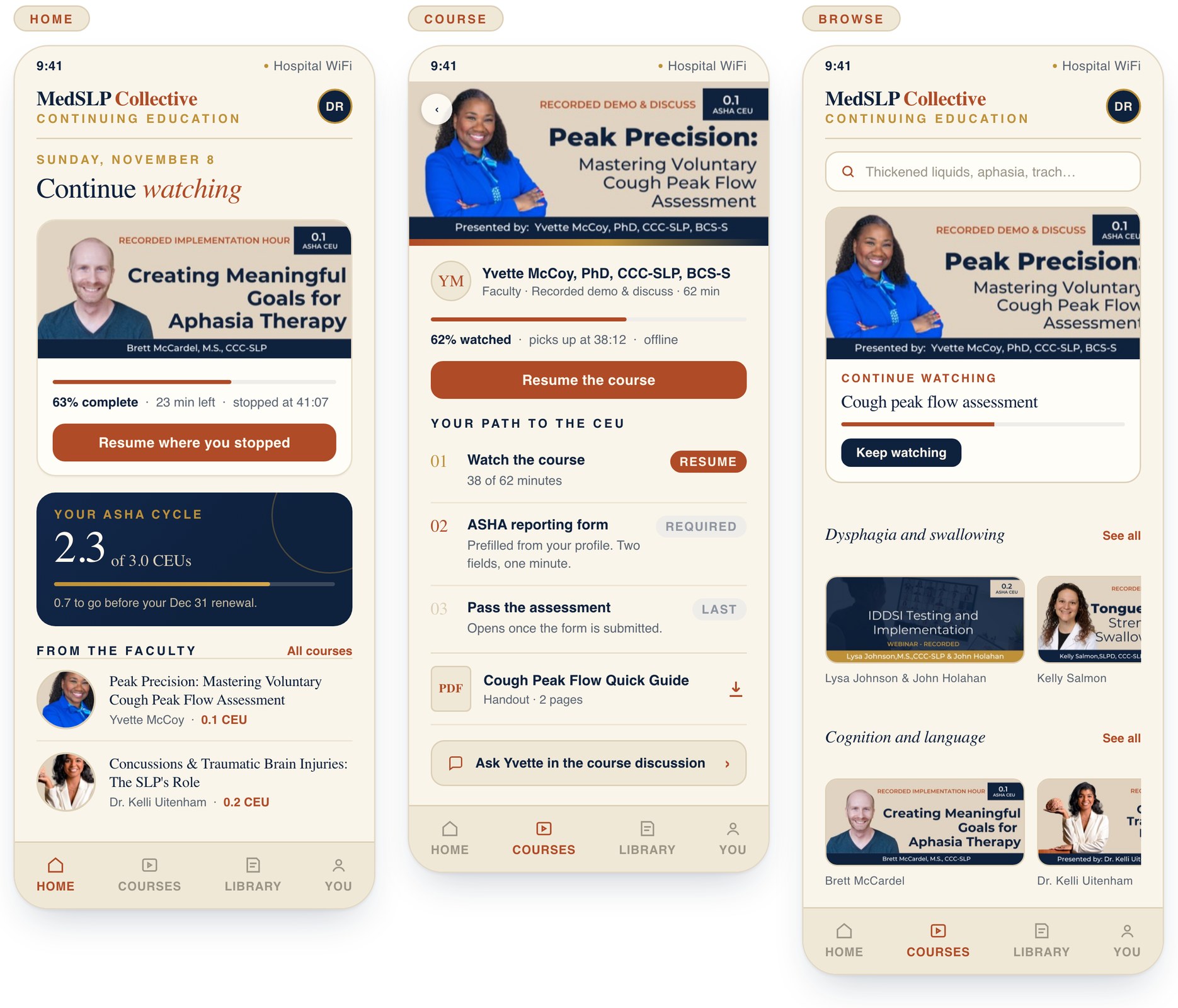
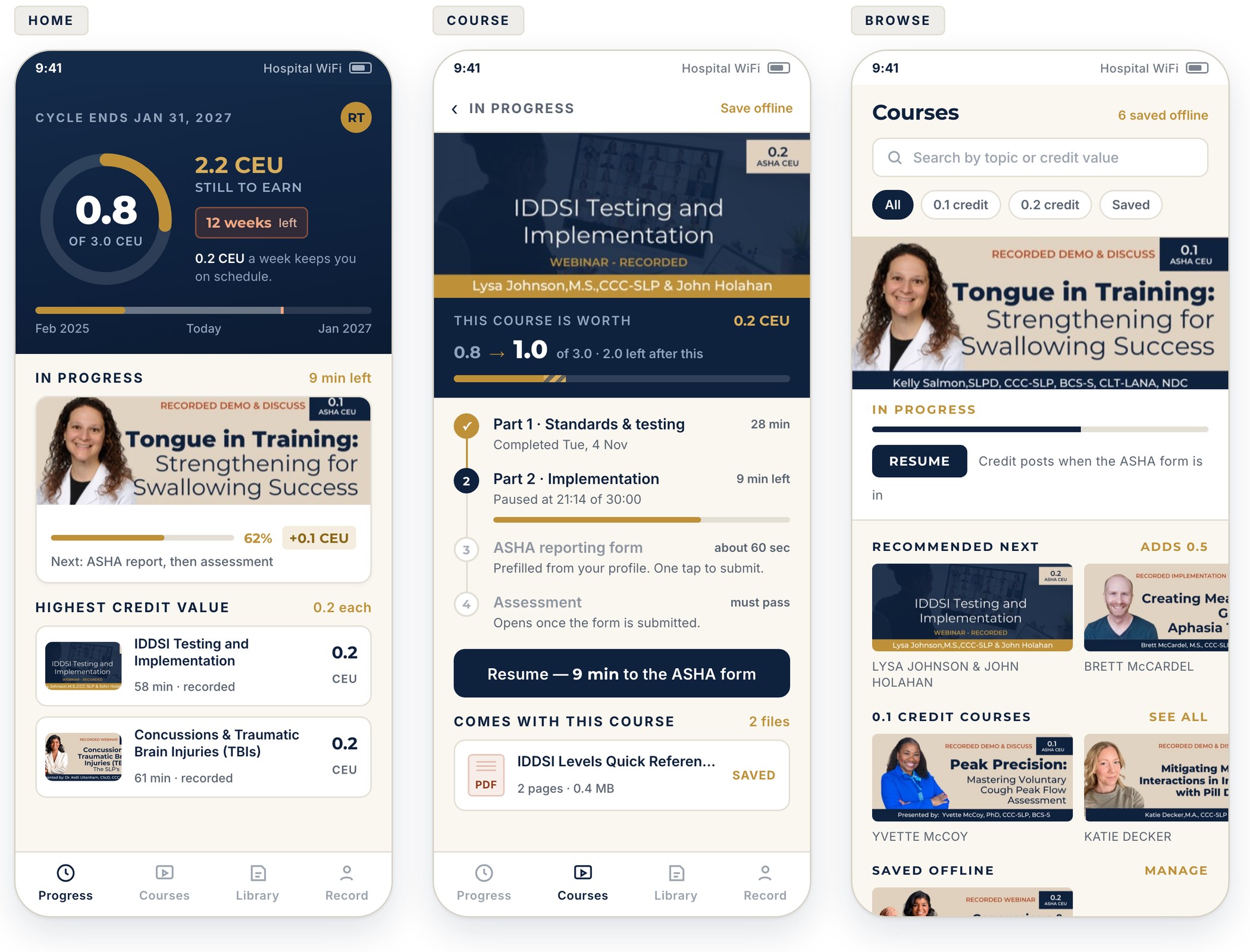
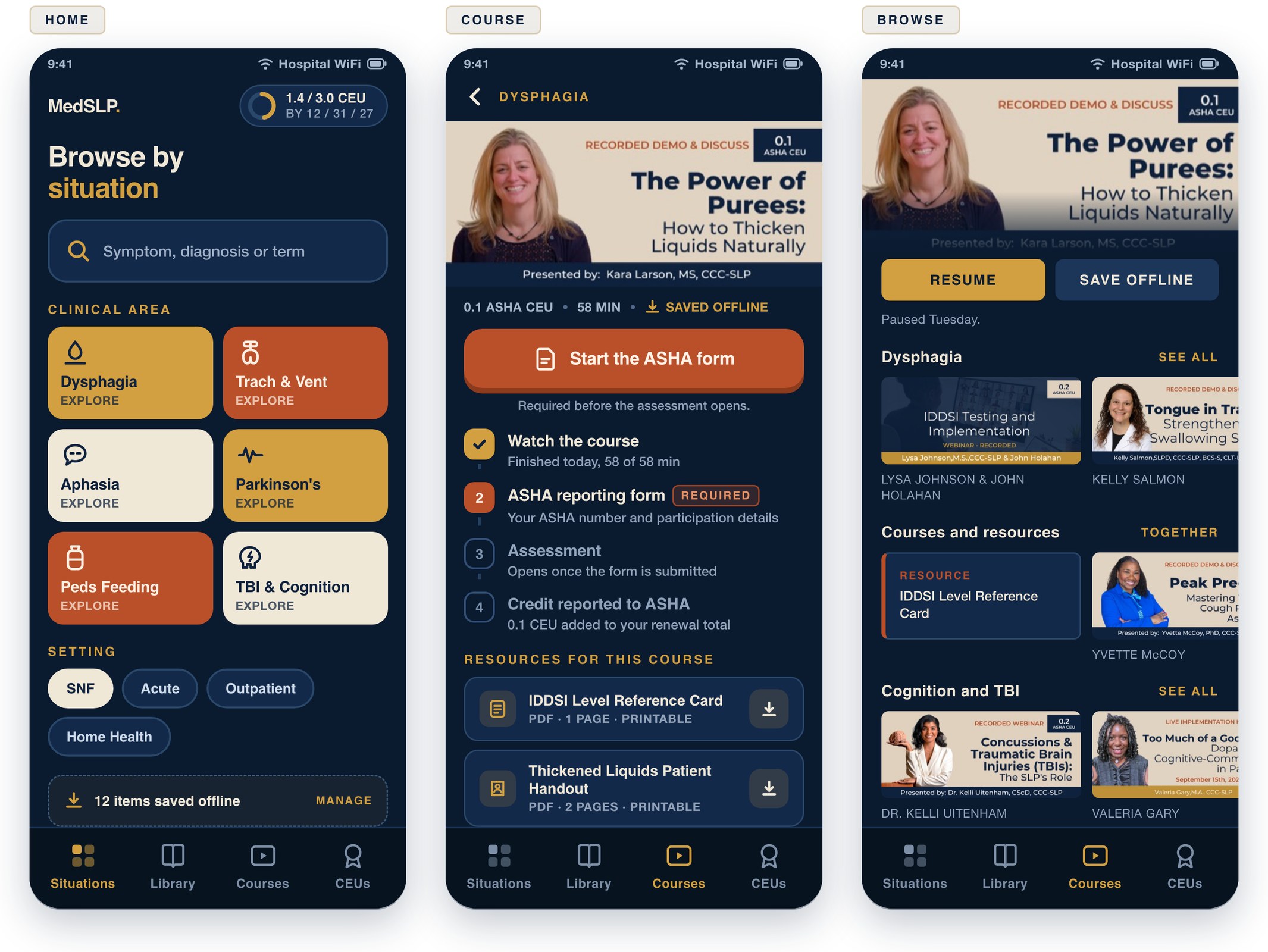
Your brand first, then four directions. You do not have to pick one whole. Tell us which home screen, which course screen and which browse screen, and we will build the hybrid.
Business Builders
The Blueprint
First question
Do you have
a brand guide?
If yes, send us
The logo files, the colours with hex codes, the fonts and whether you hold a licence to use them on a website and in an app.
If no
We work from what your site and course artwork already use, and write the guide as we go, so you end up owning one either way.
Either way
Who gets the final say on how it looks? Everything in the next four slides needs one name behind it.
The screens that follow are drafts in the colours your site uses today. Swap them freely.
Business Builders
The Blueprint
Four directions, every screen
Direction one
Calm clinical
Opens on your CEU balance. Almost no colour.
Direction two
Warm editorial
Opens on the course you paused. Cream paper, serif type.
Direction three
Renewal tracker
Opens on how far you are from renewal. Rows named by credit.
Direction four
Bedside companion
Opens on clinical situations, not courses. Dark and loud.
Business Builders
The Blueprint
What we agree
before we leave.
What stays, what we rebuild, what costs money, and what happens next.
Business Builders
The Blueprint
Say yes to each column
Keep, replace,
and decide later.
Keep
Checkout and membership billing
Email and CRM
Your reporting process, exactly as it runs
The catalog, the artwork, the course sequence
Every completion record you hold
Replace
The WordPress front end
The learning plugin, at cutover and not before
The bridge plugin between cart, email and site
A separate copy of the form on every course
Video hosted on an address facilities block
Decide later
The mobile app
Member facing CEU tracking
Anything that automates the reporting pull
Anything raised today that is not on this slide
Business Builders
The Blueprint
What costs money
Going custom moves
where the money goes.
New, and ongoing
Storing and delivering your video
Hosting the application itself
Developer accounts, only if you ship an app
Support and maintenance, on terms you choose after launch
New, and one time
Building each custom piece in the replace column
Moving your historical records across
Moving your video library off its current host
Anything in the decide later column, if you say yes to it
Stops costing you
The learning plugin licence
The bridge plugin subscription
The forms tool and its add ons
Your video host
WordPress hosting and the upkeep around it
No figures yet
This slide names the lines that will carry a cost, not the amounts. Those get set as the build scope is settled, not today.
Business Builders
The Blueprint
What happens next
Prove, design, build,
then you choose.
First
Audit every layer
We go through all eight layers against your live site and accounts, and hand you what we find.
Then
Design and agree
Real screens with your real courses, reviewed with you until the member experience is settled.
Then
Build the front end
The working front end you were promised, running on your live catalog, with video served from your own address. That is the deliverable, not a document.
At the end
You choose
A scope and a price for every layer we did not build. Take it forward with us, with someone else, or not at all.
Starts when
The audit work can begin the day after this meeting.
Business Builders
Monday November 9, 2026
Thank
you.
Everything in here is yours to argue with.
Next
We write the scope of work from today's answers, and the audit starts the day after this meeting.
Theresa Richard · Kristen West · Joy Rhodes · Chris Webster